Relyant
Home
Blog
Pricing
LoginRequest a Demo
  1. Home
  2. Facilities & Assets
  3. Maintenance (CMMS)
CMMS for schoolsAvailable now

Every broken thing becomes a tracked job.

Anyone on campus scans a QR code and reports the problem. The request lands with the right technician, the job gets closed from their phone, and the fix is logged against the asset for good.
Request a demoSee all of Facilities
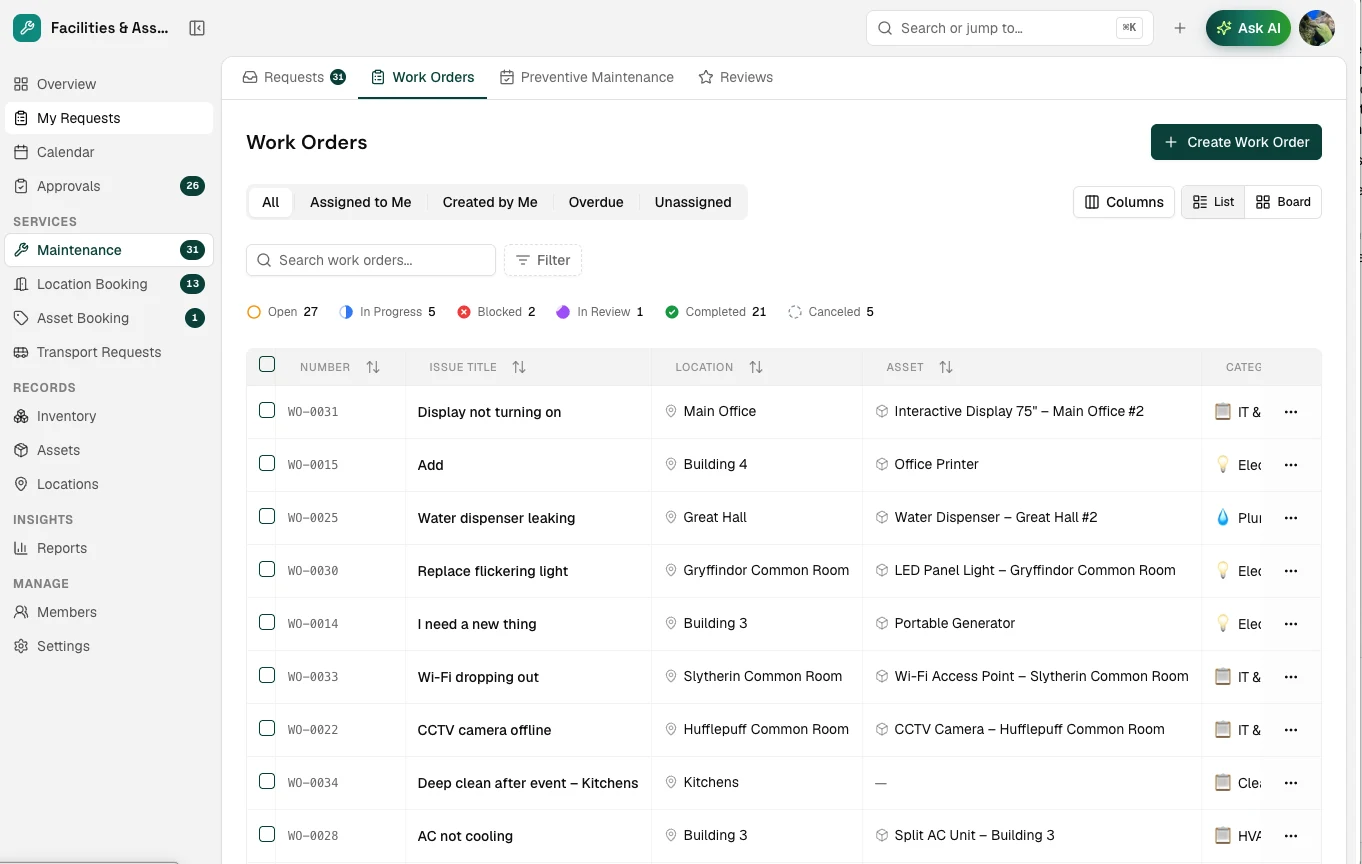
Relyant Work Orders: maintenance jobs by location and asset, with open, in-progress and completed counts
Reported by QR codeWater dispenser leaking · Great Hall
Assigned automaticallyPlumbing · Pak Budi
Preventive check dueAC servicing · Building 3
Before Relyant

Maintenance runs on chat messages and memory.

Requests arrive by WhatsApp, email and in the corridor. Nobody knows what’s open, servicing gets missed until something breaks, and the history leaves with whoever fixed it.

Requests lost in group chats

A leak reported on Monday scrolls out of view by Tuesday, and nobody is sure who picked it up.

did anyone fix this?

Servicing only when it breaks

AC units, generators and pumps get attention after they fail, usually in the middle of term.

AC down again

No record of what was done

Repair costs, parts and notes live in a technician’s head, so you can’t decide when to repair or replace.

when was this serviced?
Who it’s for

Everyone on campus keeps it running.

A smiling teacher holding a stack of books
Teachers & staff

Spot it, scan it, get back to class.

The projector dies mid-lesson. Scan the QR code by the door, describe the problem in a line, and it’s a tracked ticket. No login, no chasing the facilities chat.

Report a problem
LocationRoom 2.14
AssetProjector
CategoryIT & AV
StatusAssigned
Reported without logging in or installing an app.
Scan to report
Ticket createdProjector · Room 2.14
StatusTechnician assigned
A smiling facilities manager holding a tablet
Facilities team

Every job routed, nothing forgotten.

Requests arrive sorted by category and location and go to the right technician. Overdue and unassigned work is one filter away, and preventive tasks show up before they’re due.

Work orders
Water dispenser leakingIn progress
AC not coolingOverdue
Replace flickering lightAssigned
Generator checkDue Thursday
Two HVAC jobs are open in Building 3. Group them into one visit?
Work orders
AssignedPlumbing team
Due this weekAC servicing · Building 3
A smiling principal holding a folder
School leaders

Know what your buildings really cost.

Every repair and part is logged against the asset, so you can see which equipment keeps failing and budget to replace it instead of patching it again.

Asset history · Split AC, Building 3
Gas top-upLast term
Fan motor replacedThis term
Not coolingOpen
Next stepPlan replacement
This unit has needed repeat repairs this year. Worth budgeting a replacement.
Split AC
Repeat repairsSplit AC · Building 3
Next budgetReplace, don’t patch
Teachers & staff

Spot it, scan it, get back to class.

The projector dies mid-lesson. Scan the QR code by the door, describe the problem in a line, and it’s a tracked ticket. No login, no chasing the facilities chat.

A smiling teacher holding a stack of books
Scan to report
Ticket createdProjector · Room 2.14
Report a problem
LocationRoom 2.14
AssetProjector
CategoryIT & AV
StatusAssigned
Reported without logging in or installing an app.
A smiling teacher holding a stack of books
Teachers & staff

Spot it, scan it, get back to class.

The projector dies mid-lesson. Scan the QR code by the door, describe the problem in a line, and it’s a tracked ticket. No login, no chasing the facilities chat.

Report a problem
LocationRoom 2.14
AssetProjector
CategoryIT & AV
StatusAssigned
Reported without logging in or installing an app.
Scan to report
Ticket createdProjector · Room 2.14
StatusTechnician assigned
Facilities team

Every job routed, nothing forgotten.

Requests arrive sorted by category and location and go to the right technician. Overdue and unassigned work is one filter away, and preventive tasks show up before they’re due.

A smiling facilities manager holding a tablet
Work orders
AssignedPlumbing team
Work orders
Water dispenser leakingIn progress
AC not coolingOverdue
Replace flickering lightAssigned
Generator checkDue Thursday
Two HVAC jobs are open in Building 3. Group them into one visit?
A smiling facilities manager holding a tablet
Facilities team

Every job routed, nothing forgotten.

Requests arrive sorted by category and location and go to the right technician. Overdue and unassigned work is one filter away, and preventive tasks show up before they’re due.

Work orders
Water dispenser leakingIn progress
AC not coolingOverdue
Replace flickering lightAssigned
Generator checkDue Thursday
Two HVAC jobs are open in Building 3. Group them into one visit?
Work orders
AssignedPlumbing team
Due this weekAC servicing · Building 3
School leaders

Know what your buildings really cost.

Every repair and part is logged against the asset, so you can see which equipment keeps failing and budget to replace it instead of patching it again.

A smiling principal holding a folder
Split AC
Repeat repairsSplit AC · Building 3
Asset history · Split AC, Building 3
Gas top-upLast term
Fan motor replacedThis term
Not coolingOpen
Next stepPlan replacement
This unit has needed repeat repairs this year. Worth budgeting a replacement.
A smiling principal holding a folder
School leaders

Know what your buildings really cost.

Every repair and part is logged against the asset, so you can see which equipment keeps failing and budget to replace it instead of patching it again.

Asset history · Split AC, Building 3
Gas top-upLast term
Fan motor replacedThis term
Not coolingOpen
Next stepPlan replacement
This unit has needed repeat repairs this year. Worth budgeting a replacement.
Split AC
Repeat repairsSplit AC · Building 3
Next budgetReplace, don’t patch
How it works

From “something’s broken” to fixed and logged.

  1. 01

    Report it

    Scan the QR code on the wall or use the app. No login needed for the person reporting.

  2. 02

    Route it

    The request reaches the right team by trade, location or workload, with a priority attached.

  3. 03

    Fix it

    Technicians see their jobs on their phone, update the status and close them on the spot.

  4. 04

    Keep the history

    Every job, part and note is saved against the asset, ready for audits and budget planning.

What’s included

A complete CMMS, sized for a school.

Everything a facilities team needs to run maintenance across a campus, without the setup of an industrial system.

Work orders

Every job has a clear status from open to completed, with list and board views and filters for overdue or unassigned work.

Preventive maintenance

Schedule recurring tasks such as AC servicing, generator checks and pool cleaning, with reminders before they’re due.

Automatic assignment

Route work to the right technician by trade, location or workload. Managers can reassign at any time.

QR-code requests

A code on the wall opens the request form. A leaking tap is a ticket before the reporter walks away.

Mobile for technicians

Technicians pick up, update and close jobs from the corridor instead of returning to a desk.

Asset history

Every repair, part and note is saved against the asset, so you know when to repair and when to replace.

Ask the Agent

Ask what’s overdue before it becomes a complaint.

Relyant’s AI Agent reads the same work orders your team uses. Ask it what’s open or overdue, and it drafts the next step for a person to approve. It never acts on its own.

Agent
Which maintenance jobs are overdue in Building 3?
Two jobs in Building 3 are past their due date, and one preventive check is due this week:
AC not coolingOverdue · HVAC
Replace flickering lightOverdue · Electrical
Generator checkDue Thursday
Reassign the AC jobRemind the HVAC team
Ask anything…
Works with

Connected to the rest of your campus.

Stock & InventoryTrack spare parts and raise purchase orders when stock runs low.
Room bookingSee which rooms are booked before a job closes a space for the day.
Help DeskOne front door for IT, facilities and every other request on campus.
Guides

Read more about it

  • What is a CMMS? A Complete Guide for Facilities ManagersLearn everything you need to know about Computerized Maintenance Management Systems and how they can transform your facilities operations.
  • How to Choose the Right CMMS Software for Your OrganizationA step-by-step guide to evaluating and selecting a CMMS that fits your team's needs and budget.
  • 5 Benefits of Preventive Maintenance for SchoolsDiscover how preventive maintenance can save your school money, extend asset life, and create a safer environment for students and staff.
  • Building an Effective Maintenance Request WorkflowLearn how to design a maintenance request process that keeps everyone informed and issues resolved quickly.
CMMS FAQ

Questions schools ask about maintenance software.

A CMMS (computerised maintenance management system) is software that tracks maintenance work: requests, work orders, preventive maintenance schedules, and the repair history of each asset. For schools it replaces the chat messages, paper logbooks and spreadsheets that maintenance usually runs on.

Stop chasing repairs.
Track them.

Leave your email and we’ll show you Relyant with your own buildings, assets and teams.

See pricing →
Relyant

All-in-one software for schools. Run your facilities and student operations on one platform — the system teachers, admin, ops, and school leaders all share.

hello@relyant.app

Solutions

Facilities & AssetsStock & InventoryEducationSoonScribeSellHRIS

Features

Room bookingMaintenance (CMMS)AdmissionsUniform shopTransportHelp deskAI meeting notes

Pages

HomeOur SolutionsPricingBlogTestimonials

Company

ContactLoginRequest a DemoPrivacy Policy

© 2026 Relyant. All rights reserved.