Inventory Management That Doesn't Live in a Spreadsheet
Track supplies, spare parts, and consumables across every stockroom and location. Get alerts before you run out — not after.
You shouldn't find out you're out of stock when you need something most
Most schools and small businesses track inventory in spreadsheets that nobody updates, or don't track it at all. Supplies disappear, reorders happen too late, and nobody knows what was used on which job.
Before
🔴 Spreadsheet inventory that's always out of date
🔴 Discovering you're out of stock when a repair is urgent
🔴 No idea who took what or when
🔴 Manual stock counts during end-of-term audits
🔴 Reorders placed too late — or duplicated by different staff
🔴 Spare parts scattered across stockrooms with no central view
After
🟢 Real-time stock levels updated with every movement
🟢 Automated low-stock alerts before you run out
🟢 Every check-in, check-out, and transfer logged with who and when
🟢 Low stock triggers a draft purchase order automatically
🟢 Full audit trail for every item movement
🟢 Multi-location visibility across all stockrooms and buildings
From stockroom chaos to full visibility in 3 steps
Set up your inventory once. The system keeps it accurate from there.
1
Add Your Items
Import your current inventory from a spreadsheet or add items manually. Set categories, locations, minimum stock levels, and suppliers for each item.
2
Track Every Movement
Every time an item is used, transferred, received, or disposed of, it's logged automatically. Staff can check out items via web or mobile — no paper forms needed.
3
Get Alerts & Reorder
When stock drops below your set threshold, the system alerts your team and can auto-generate a draft purchase order. No more last-minute scrambles.
Built for Teams Struggling with hassle of managing inventory
Every feature designed for the people who actually fix things.
📍
Multi-Location Tracking
Monitor stock across buildings, floors, stockrooms, or campuses from a single dashboard.
🔔
Low-Stock Alerts
Set minimum thresholds per item. Get notified by email or in-app when stock drops below the line.
📋
Movement Logging
Every check-in, check-out, transfer, and adjustment is recorded — who did it, when, and where.
📦
Category & Tag Organisation
Group items by type, department, supplier, or custom tags. Filter and search in seconds.
🔗
Linked to Work Orders
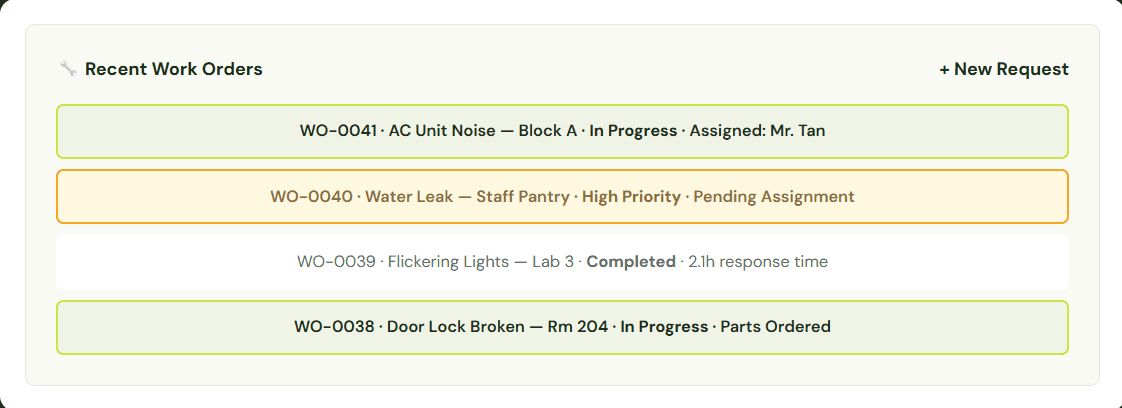
When a technician uses a part on a repair, inventory updates automatically.
📊
Usage Reports & Trends
See consumption patterns, fast-moving items, and spend by category. Export for audits.
How Sekolah Victory Plus stopped running out of supplies mid-term
Sekolah Victory Plus managed supplies across multiple stockrooms using spreadsheets and manual counts. Updates were inconsistent — by the time someone checked the sheet, the actual stock was already different. The operations team regularly discovered shortages only when staff came asking, leading to emergency purchases at premium prices.
After implementing Relyant's Inventory module, every stockroom has real-time visibility. When supplies hit the reorder threshold, the system sends an alert to the operations team and generates a draft purchase order. The team now reviews and approves POs on a regular cycle instead of scrambling to reorder.
Emergency purchases dropped dramatically. The school saves time and money each term by consolidating orders and buying at regular prices instead of last-minute markups.
"We used to find out we were out of something when staff came to tell us. Now the system tells us before it happens."
— Exsaudi Simanjuntak, Sekolah Victory Plus
100%
real-time stock visibility
90%
reduction in emergency purchases
4hrs+
saved weekly on stock counts
Works even better with
CMMS is just the foundation — connect it with other modules for a complete operations platform.
🔧
CMMS
Parts used on repairs deducted automatically
Features :
✓ When a technician closes a work order, parts used are deducted from inventory
✓ See which assets consume the most spare parts
✓ Link inventory items to specific assets and locations
✓ Maintenance history shows parts cost per job
📝
Purchase Orders
Low stock triggers a purchase order automatically
Features :
✓ Route the PO through your approval workflow before it's sent
✓ Received items update inventory levels automatically
✓ Full spend tracking from PO creation to delivery
✓ Full audit trail for every purchase order
🧩
Custom
Tailor inventory workflows to how your team works
Features :
✓ Add custom fields to items (expiry dates, storage conditions, hazard ratings)
✓ Build approval flows for high-value or restricted items
✓ Create custom alerts for specific categories or locations
✓ Design customisable check-out forms
Frequently Asked Questions
Common questions about our CMMS software and how it can help your facilities team.
What types of items can I track?
Anything your organisation stores and uses — cleaning supplies, spare parts, stationery, tools, first aid stock, lab consumables, IT accessories, and more. Each item can have its own category, location, supplier, minimum stock level, and custom fields.
Can I track inventory across multiple buildings or campuses?
Yes. Every item is assigned to a specific location (building, floor, stockroom). You can view stock levels per location or across all locations at once. Transfers between locations are logged automatically.
How do low-stock alerts work?
You set a minimum threshold for each item. When the quantity drops below that number, the system sends an alert via email and in-app notification. If you have the Purchase Orders module enabled, it can also auto-generate a draft PO.
Does inventory update automatically when parts are used on a work order?
Yes, if you're using the CMMS module alongside Inventory. When a technician logs parts used on a work order, the quantities are deducted from your inventory automatically. No double entry required.
See it in action
See how Relyant keeps your stockrooms organised — without the spreadsheets.
⚡
Setup in under 24 hours
💳
No credit card required
🔒
Enterprise-grade security
🎯
99.9% uptime SLA